# meatshell
[简体中文](./README.md) | **English**
A lightweight, low-memory SSH / terminal client inspired by FinalShell, but
written entirely in **Rust + [Slint](https://slint.dev)**. The goal is to keep
FinalShell's core experience (resource-monitor sidebar, session management,
tabbed terminals) while cutting memory use from the 400 MB+ of a JVM app down to
the tens-of-MB range of a native binary.
## Screenshots
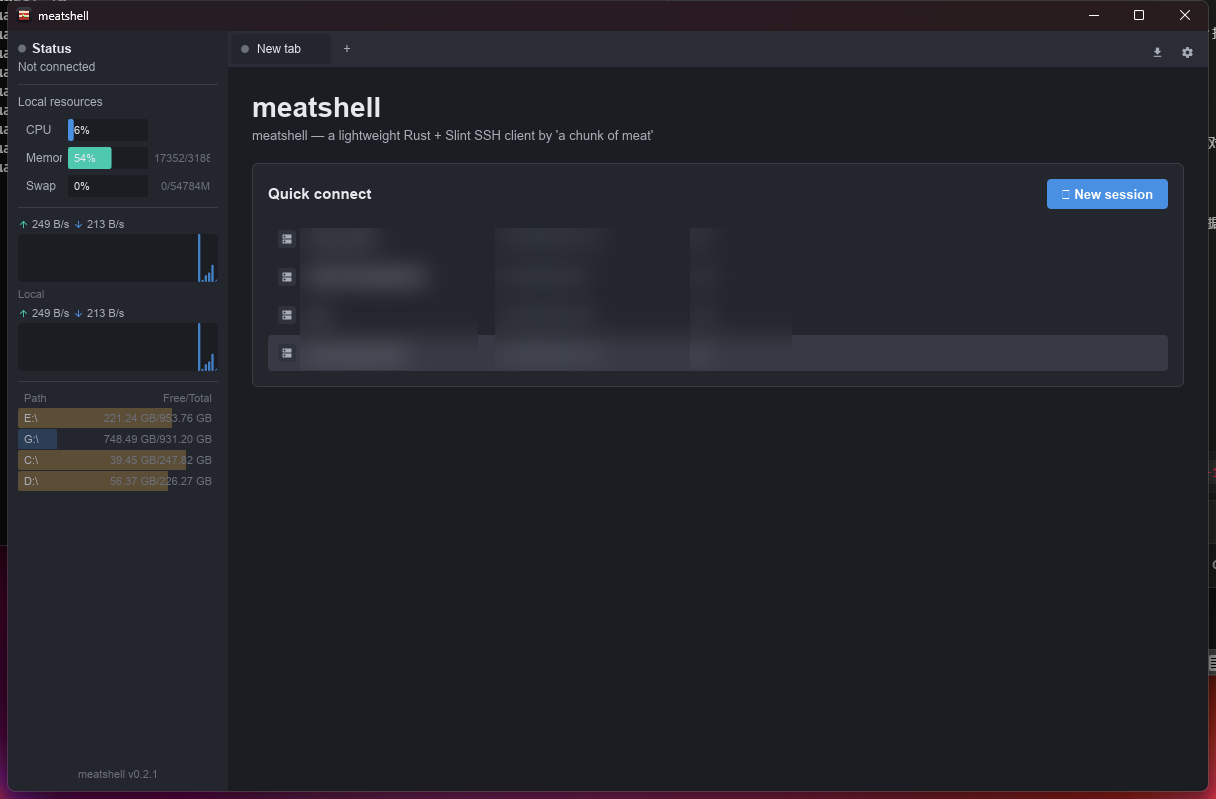
Welcome page: session management + local resource monitor sidebar
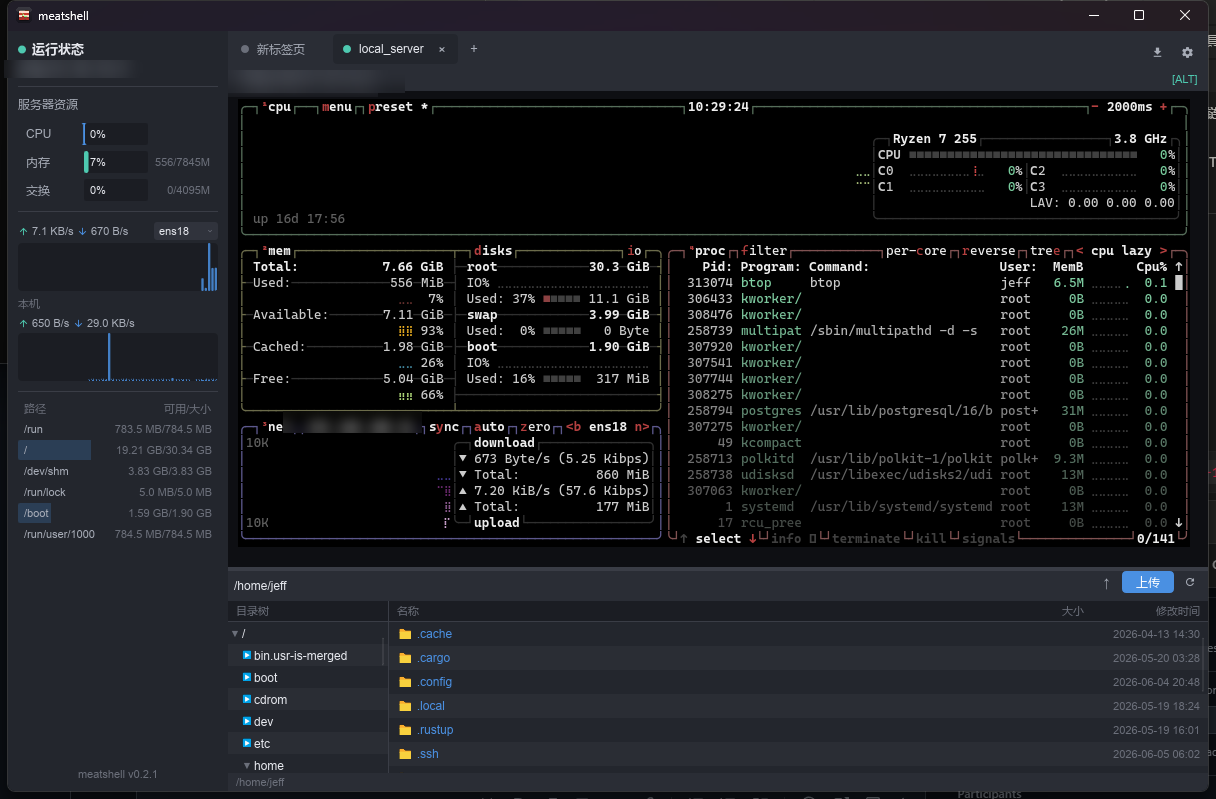
Tabbed terminal (full-screen btop) + SFTP file browser + remote resource monitoring
## Download & install
Every pushed `v*` tag triggers a Gitea Actions build that produces the Windows
GNU package and publishes it on the
[Releases](https://git.miuoo.qzz.io/Miu/meatshell/releases) page.
### Windows
Download `meatshell-*-windows-x86_64.zip`, unzip, and run `meatshell.exe`.
At runtime, `meatshell-debug.log` is written next to `meatshell.exe`; check it first for SSH connection crashes or unexpected exits.
### Linux
```bash
tar -xzf meatshell-*-linux-x86_64.tar.gz
cd meatshell-*-linux-x86_64
./meatshell # run it directly
# Optional: install the app icon + launcher entry (shows the icon in the dock /
# app list — no argument needed, it finds the binary next to the script)
chmod +x install-linux.sh && ./install-linux.sh
```
> Requires glibc ≥ 2.35 (Ubuntu 22.04+ / Debian 12+). On Wayland you may need to
> log out/in once after installing the icon.
### macOS
```bash
tar -xzf meatshell-*-macos-*.tar.gz # aarch64 = Apple Silicon, x86_64 = Intel
xattr -dr com.apple.quarantine meatshell # clear the "unsigned app" Gatekeeper flag
./meatshell
```
> To build from source, see [Running](#running) below.
## Roadmap
### v0.1
- [x] FinalShell-style dark theme UI
- [x] Local system monitor sidebar (CPU / memory / swap / network throughput, 1 Hz)
- [x] Tabs (welcome page + multiple terminal sessions)
- [x] Session management: create / edit / delete, persisted to local JSON
- Config location: `%APPDATA%/meatshell/sessions.json` (Windows)
/ `~/.config/meatshell/sessions.json` (Linux)
/ `~/Library/Application Support/meatshell/sessions.json` (macOS)
- [x] SSH connection scaffold (`russh`, pure Rust, password + private key)
- [x] Raw PTY input + VT/ANSI terminal view
### v0.2
- [x] Full VT/ANSI terminal emulation (`vt100`/xterm parser, full-screen TUI, scrollback, find, select-copy)
- [x] Remote host resource monitoring (run a remote collector script, like FinalShell)
- [x] SFTP file browser + drag-and-drop upload/download
- [x] Known-hosts (`known_hosts`) verification (TOFU into the app known_hosts, reject changed keys)
- [x] Store session passwords in the OS keychain (encrypted config fallback when unavailable)
### v0.3+
- [x] Split panes for tabbed terminals
- [x] Session groups / folders
- [x] Theme switching (light / follow system)
- [x] Command history & snippet management
## Tech stack
| Module | Choice |
| ------------- | ----------------------------------------------------------------- |
| UI | [Slint](https://slint.dev) (compiled pure Rust, no GC) |
| Async runtime | [`tokio`](https://tokio.rs) |
| SSH protocol | [`russh`](https://crates.io/crates/russh) (no libssh dependency) |
| System metrics| [`sysinfo`](https://crates.io/crates/sysinfo) |
| Serialization | `serde` + `serde_json` |
| Logging | `tracing` + `tracing-subscriber` |
## Running
```bash
cargo run --release
```
On first launch an empty session store is created at
`%APPDATA%/meatshell/sessions.json`. Click **"+ New Session"** in the top-right
to add your first server.
## Project layout
```
meatshell/
├── Cargo.toml
├── build.rs # Slint compiler entry point
├── ui/
│ ├── app.slint # top-level window
│ ├── theme.slint # design tokens
│ ├── widgets.slint # reusable buttons / inputs / sparkline
│ ├── sidebar.slint # left-hand system monitor panel
│ ├── tabs.slint # top tab bar
│ ├── welcome.slint # welcome page / quick connect
│ ├── session_dialog.slint # new / edit session dialog
│ └── terminal_view.slint # VT/ANSI terminal view + command bar / SFTP panel
└── src/
├── main.rs
├── app.rs # UI ↔ backend bridge
├── config.rs # session JSON persistence
├── keychain.rs # OS keychain password storage + encrypted fallback
├── known_hosts.rs # OpenSSH known_hosts verification
├── system.rs # CPU / memory / network sampling
├── ssh.rs # SSH session worker
└── sftp.rs # SFTP browser / transfer worker
```
## Development notes
- Slint widgets use a strict layout DSL; after editing a `.slint` file,
`cargo check` is the fastest feedback loop.
- The application event loop is single-threaded (required by Slint); all
cross-thread UI updates go through `slint::invoke_from_event_loop` callbacks.
- `known_hosts` uses trust-on-first-use (TOFU): first connections are written
to meatshell's own `known_hosts`; later server-key changes are rejected.
- Session passwords prefer the OS keychain; when no keychain backend is
available, meatshell falls back to local ChaCha20-Poly1305 encrypted config.
## License
Dual-licensed under MIT OR Apache-2.0.